Advanced Golf Address
Address the Game
Measure it. Address it. Hit it.

Every golf lesson is about the swing.
Almost none are about where you stand.

Give Advanced Golf Address two measurements, your height and your wrist to floor, and it works out your address position for every club in the bag. How far to stand from the ball, where the ball sits in your stance, how wide to set your feet. One number each, for your body.

Seven days free, then $39.99 a year. iPhone is coming.

The Advanced Golf Address tool screen showing 37.7 inches from the ball, a 22.4 inch stance and a 24 degree bend for the driver
How it works

Two measurements. Every club in the bag.

You measure once, at home, with a tape. The app does the rest, and it does not ask you to guess at anything.

1

Measure twice

Your height, and your wrist to the floor standing straight. That is the whole setup. It takes a minute and you never do it again.

2

Get your numbers

Distance from the ball, ball position and stance width, worked out for every club you carry. Driver through wedge, including the ones you had built long or short.

3

Mark the club once

The Two Tape Method puts your numbers onto the shaft itself. After that you set up to the club instead of measuring, and the numbers come with you to the range.

The method

Two pieces of tape, and you stop guessing.

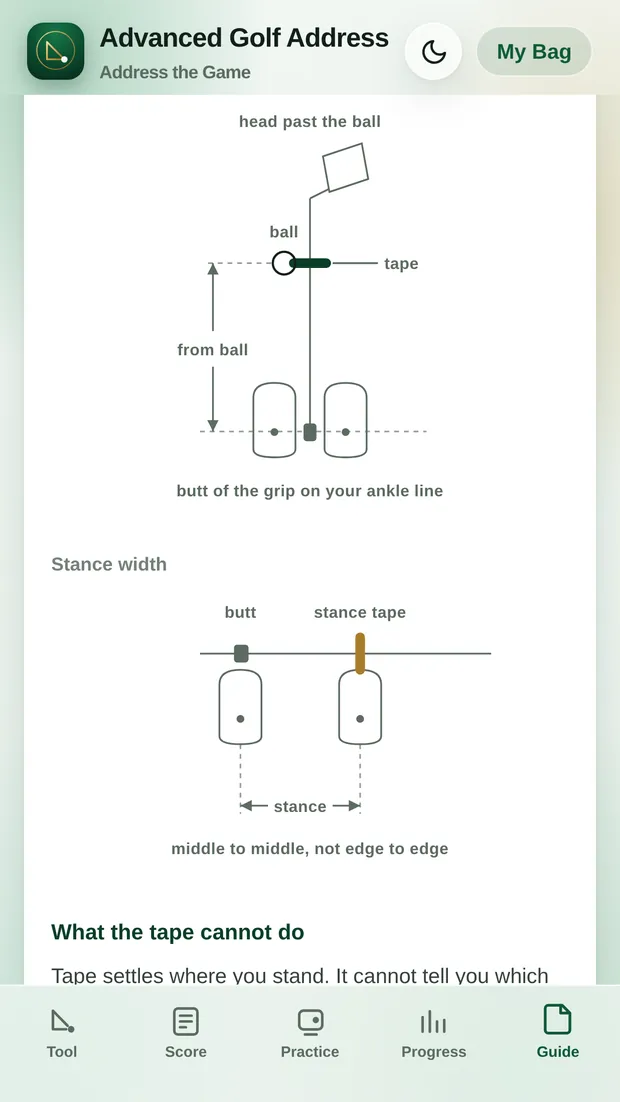
One piece of tape marks where the butt of the grip should sit on your ankle line, which fixes how far you stand from the ball. The second marks your stance width, measured middle to middle rather than edge to edge.

Set up to the tape and the address position is the one the app calculated, every time, without a tape measure on the range and without a second opinion.

The tape is honest about what it cannot do. It settles where you stand. It has nothing to say about where you are aimed, which is what the compass is for.

Read the full method ›

Diagram from the app showing the tape on the shaft at the ankle line, and the stance tape measured middle to middle
Inside the app

The setup is the start of it.

Everything else in the app exists because it is the next question a golfer asks after where do I stand.

The aim screen using the phone compass to show whether the feet are square to the target line

Aim

Your phone already knows which way it is pointed. Lay it along your feet and the app tells you whether your stance is actually square to your line, rather than square to where it feels square.

The gapping chart showing carry distances for each club in the bag

Gapping

Log real carries and the bag sorts itself into order. The chart stays out of sight until it has enough shots behind it to be worth reading.

The practice logger asking about strike and flight, with a clubface diagram

Practice

Two questions a shot, strike and flight, answered by tapping a picture of a clubface. No jargon to learn first, and no scrolling in the middle of a session.

The scorecard screen with a selected course and hole by hole entry

Scorecard

Over 30,000 courses to pick from, so the round you played and the practice you put in live in the same place instead of two apps that never speak.

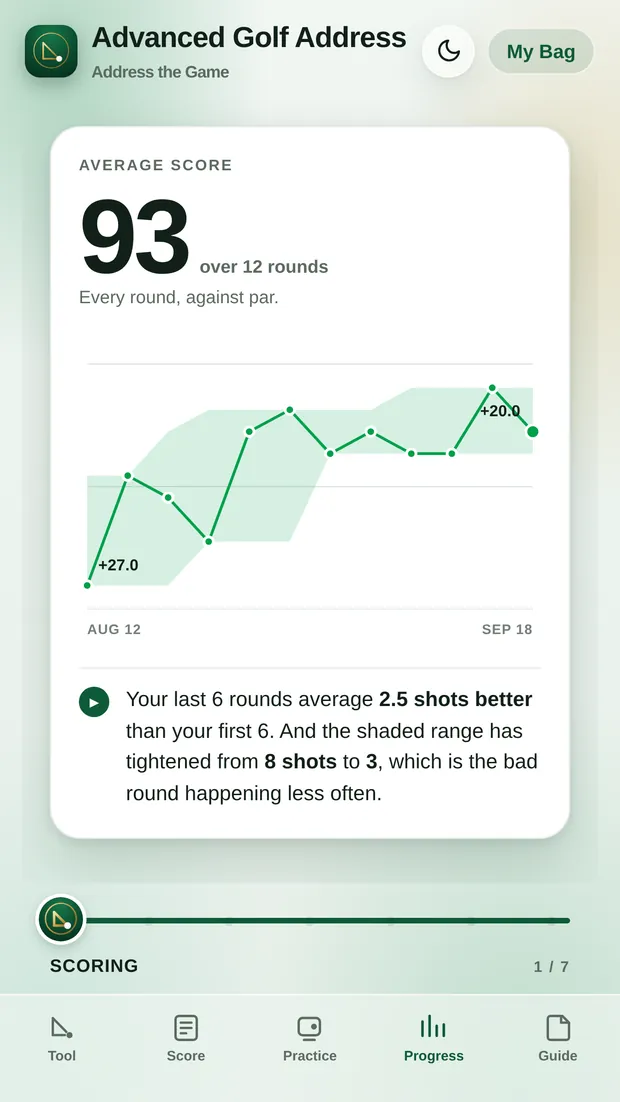
The Progress card deck showing an average score of 93 over 12 rounds, with the best to worst range drawn behind the line
Progress

Every round you log has something to say.

Progress is seven full screen cards you roll through with a slider. What you average and which way it is moving. Where the shots actually go. How you strike it. Whether the practice is showing up in the score. What the big holes cost. How you play each course you have played more than once.

Your score against par splits exactly in two: the strokes it takes to reach the green, and the strokes it takes once you are on it. They add up with nothing left over, which is why a card can tell you where a round was really lost rather than where it felt lost.

When you want all of it at once, the report card puts your last twenty rounds, your record at each course and your strike pattern into a single image you can save or send.

Price

One subscription. The whole app.

$39.99 a year
First 7 days free

There are no tiers and nothing is held back for a higher plan. Cancel in Google Play at any time during the trial and you are not charged.

Address the Game.

Advanced Golf Address is on Google Play. If you already have an access code, you can open the web app instead.

Get it on Google Play

Open the web app ›